Initial Seed RNG
Last updated: 2026-03-24 UTCThis guide assumes you have found your target seed. You need your target seed before following this guide.
Tools
What is RunAsDate?
RunAsDate is a tool by Nirsoft that loads any program with a user-specified time. It's useful for Gen 5 RNG and helps you hit your seed easily. This guide focuses only on RunAsDate.Step 1: Setup RunAsDate
- Launch RunAsDate.
- Configure RunAsDate to match the image below.
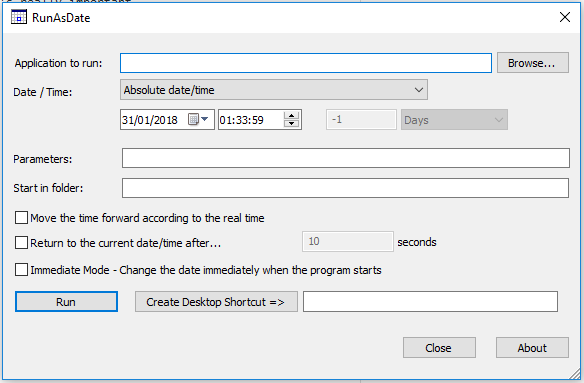
You'll never need to change this again. This is the universal RunAsDate configuration for RNG (Gen 3, 4, or 5).
- Select the program you want to fake the date/time using the Browse... button.
- Set the date and time to one of the given times in PokeFinder to hit your seed.
- Hit Run, and Desmume should launch.
Step 2: Hitting the target seed
- Load the Lua script.
- Load your game.
- Do any necessary keypresses to hit your target seed.
- You can now continue as you would with basic RNG!
Troubleshooting
If you're not hitting the right seed on the first try with RunAsDate, check these things:- RunAsDate time.
- RNG profile.
- Keypresses needed to hit your seed.
Credits
- Chinese translation: xuanyelin, Hakuhiro.
- Italian translation: Fiask.