DS Parameters
Tools
Things To Know
You need to find your DS Parameters to proceed with RNG. This only needs to be done once per save, console, or emulator.Step 1: Set Up RNG Reporter
- Open RNG Reporter.
- Click 5th Gen Tools -> Find DS Parameters.
- Choose your game version and language.
- Set the Seed Encryption Variables:
- DS Type: Lite/Original
- DS MAC Address: 0009BF123456
- VCount: 10-70
- Timer0: 300-1200
- GxStat: 6-6
- VFrame: 0-15
- DeSmuMe's DS MAC Address is always 0009BF123456.
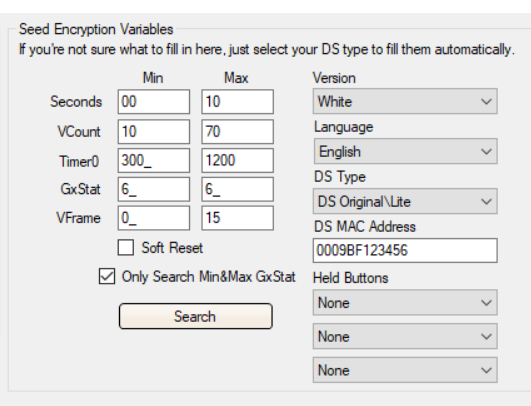
Note: If you cannot find a seed, double-check your settings. If correct, try:
- VCount: `0-FF`
- Timer0: `0-FFFF`
This will take longer to search.
Step 2: Find Your Seed
- Open RunAsDate.
- Enter any time and check Immediate Mode.
- Input the same time in the DS Parameter Finder.

- Click Run in RunAsDate and load your ROM.
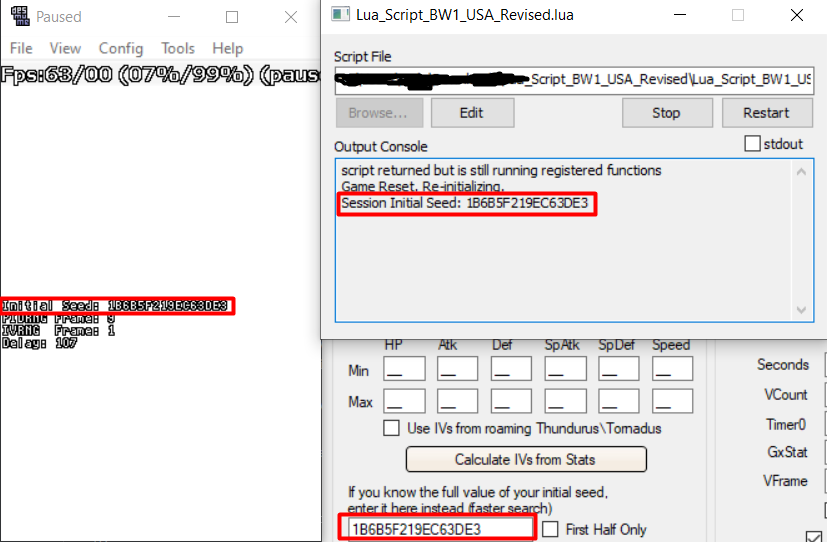
- Open your Lua script. Do not press any keys.
- Copy the seed you get and paste it into the DS Parameters Finder.
Step 3: Search for DS Parameters
- Click Search and wait for it to finish.
- When you get a result, click Send Results to Profile.
Note: You may need to redo this if you change emulation settings, saves, or redownload the emulator.
Credits
- Chinese translation: xuanyelin, Hakuhiro.